Clear Guide To Smart Computer Systems And Modern IT Operations Support
Introduction
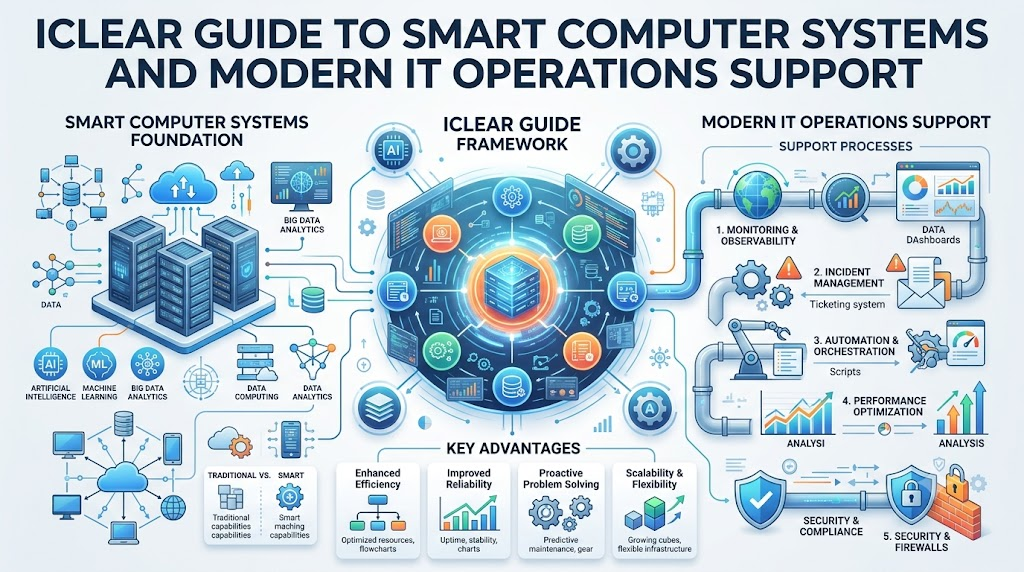
Modern computer networks produce huge piles of data every second. Computers crash, apps slow down, and teams struggle to keep up. Artificial Intelligence for IT Operations helps fix these big computer headaches. People call this AIOps for short. It combines smart computer brains with daily system support tasks. The smart software reads piles of computer health reports quickly. So, the software spots broken parts before customers notice any trouble. You will learn about basic terms, helpful tools, common errors, and real career skills in this easy guide.
What Is AIOps?
AIOps means using smart math models to run computer systems smoothly. IT operations teams keep servers, websites, and business applications working well every day. Artificial intelligence gives computer programs the power to think like human minds. Machine learning helps these programs learn from old mistakes without extra human code. Monitoring means checking computer health numbers day and night like a doctor. Logs are simple digital diary entries that tell what happened inside a machine. Metrics are direct numbers like heat levels or memory speeds. Events are special alerts when an app stops or starts. Automation means letting machines run routine tasks by themselves. Alert analysis groups similar computer alarm bells together to stop loud noise. Root-cause analysis finds the hidden source of a messy system crash quickly.
Why Do IT Teams Need AIOps?
Modern tech setups spread across many connected cloud computers worldwide. Because of this growth, engineers get thousands of alarm bells every day. Many alarms are not important, but they still wake up busy engineers. So, engineers feel tired and miss the real warning signals. Manual work takes too many hours when workers search through messy data diaries. Also, old computer bugs come back and cause the same crashes repeatedly. Systems break suddenly, but humans cannot read millions of health records fast enough. AIOps reads that giant flood of operational data within seconds. It flags real trouble early, but it cannot fix every bad line of human code.
AIOps Tasks and Benefits
| AIOps Task | Simple Meaning | Possible Benefit |
| Alert Filtering | Hiding harmless system warnings | Engineers focus on real problems |
| Anomaly Finding | Spotting weird computer activity | Teams catch crashes early |
| Event Grouping | Tying connected clues together | Workers see one clean ticket |
| Root-Cause Check | Finding the true source problem | Teams fix errors faster |
| Auto-Fixing | Running safe repair scripts | Systems recover without human delay |
| Predictive Alerts | Warning about future hardware failures | Teams swap parts before outages |
What Does TheAIOps.com Offer?
TheAIOps.com serves as a helpful online space for modern operational education. It offers practical AIOps Training so engineers can master smart monitoring tools. Learners can study structured materials through a guided AIOps Course. Professionals review requirements for an industry AIOps Certification to show verified skills. The site shares honest guides about popular AIOps Tools and software suites. Companies compare each vendor option before choosing an enterprise AIOps Platform. Teams plan major upgrades with guidance on AIOps Consulting and specialized AIOps Services. The platform explains steps for an AIOps Implementation from start to finish. It also helps any rising AIOps Engineer build strong daily troubleshooting abilities.
AIOps Training and AIOps Course
Good AIOps Training teaches real work habits instead of dry textbook theory. A beginner AIOps Course starts with basic monitoring and simple system diaries. Next, students learn how machines collect operational health numbers from cloud servers. Learners practice alert management so false alarms never hide major site outages. Then, they study anomaly detection to spot strange spikes in server memory. Lessons explain root-cause analysis so students can track down failing database queries quickly. Courses also introduce basic machine learning ideas and safe automation scripts. Working on real broken setups helps students remember steps when true outages hit.
AIOps Learning Areas
| Learning Area | What Learners Should Practice |
| Log Analysis | Reading machine diaries to find hidden system crash clues |
| Health Metrics | Tracking computer memory, storage room, and processor load numbers |
| Alert Tuning | Turning off useless warning bells that bother engineers at night |
| Pattern Spotting | Teaching machine models to notice weird traffic jumps safely |
| Cause Finding | Following broken network paths back to the bad code line |
| Safe Scripting | Writing simple auto-restart commands for frozen background tasks |
| Cloud Basics | Connecting servers, storage disks, and digital networks together cleanly |
| Team Sharing | Writing clear status notes for human managers during active incidents |
AIOps Certification and AIOps Engineer Skills
An AIOps Certification shows that you studied core concepts and passed a test. It gives you confidence, but a paper certificate never replaces true hands-on skills. A great AIOps Engineer must know how to inspect live server monitors daily. You need strong troubleshooting talent to find sneaky bugs hiding behind false alarms. Next, you need basic coding skills to write helpful automation scripts. You also need basic data skills to clean messy computer logs before training. Good engineers understand machine learning limits and talk clearly with human teammates. Building small home lab projects proves your true skill much better than multiple-choice exams alone.
AIOps Tools and AIOps Platform
Specialized software helps teams watch large computer networks without burning out workers. Engineers use observability tools to track slow web pages and broken database calls. Log tools gather millions of computer diary entries into one searchable place. Incident tools send digital notices to on-call workers when critical things break. An AIOps Platform brings all these data streams together under one smart roof. However, companies must select these suites carefully to avoid high subscription waste. Check if your current cloud computers connect easily with the new software. Check security controls, data privacy rules, and total yearly software license costs. Make sure your current team can operate the tool without painful training curves.
AIOps Implementation: How Does It Work?
Teams succeed when they roll out smart operations tools in small, careful steps. First, pick one clear headache, like a slow shopping cart web page. Next, collect clean health metrics and digital diaries from those specific servers. Connect those data streams into your smart software to drop useless alarm noise. Then, test anomaly detection algorithms against old data files to see accuracy. Let the system group related event tickets together during the next small drill. After that, test tiny automation scripts, like clearing out full temporary storage drives. Always require human manager approval before letting software execute risky server restarts. Track your downtime hours, improve the process slowly, and never automate everything overnight.
AIOps Consulting and AIOps Services
Many businesses hire outside experts to help modernize their old computer setups. AIOps Consulting helps leaders review their current tools, team habits, and tech goals. AIOps Services cover practical work like setting up software and building custom dashboards. Consultants link old internal databases with modern machine learning engines safely. They also teach existing system administrators how to maintain new automated workflows. However, hiring outside help will fail if your firm lacks clear goals first. Companies must name their biggest operational pain point before spending money on consultants. Clear goals help outside advisors build useful, reliable systems that last for years.
Real-Life Scenarios
- A retail website notices disk drives filling up fast during holiday sales, so smart scripts clean temporary cache files automatically without downtime.
- A banking app receives five hundred server alerts at once, but the system groups them into one ticket pointing to a failed network switch.
- A hospital cloud system spots strange memory usage at midnight, alerts the on-call engineer early, and prevents a total morning database lockup.
- A media streaming company uses predictive pattern tools to scale up video delivery servers two hours before a major football match begins.
How TheAIOps.com Can Help
TheAIOps.com helps tech workers and companies handle modern system operations with confidence. It offers clear learning paths for anyone wanting practical AIOps Training without confusion. You can review structured study guides in an easy AIOps Course to build practical engineering skills. The site shares unbiased breakdowns of every major AIOps Platform and software tool. It explains what to expect from an AIOps Certification so you invest your study hours wisely. Leaders explore honest planning advice for AIOps Consulting and external AIOps Services. The platform shows you how to design an AIOps Implementation that delivers real value quickly. Most importantly, it gives every future AIOps Engineer the practical knowledge needed for modern IT support.
A Practical Implementation Approach
Start your project by choosing one single system that causes frequent weekend headaches. Gather clean performance diaries and basic health numbers from those few test servers. Connect your monitoring feeds into the smart software so it learns normal baseline behaviors. Next, create simple alert rules to stop five harmless warning bells from ringing. Test the anomaly detector on that single system to verify its pattern spotting. Then, build one small automated repair job, like restarting a frozen print queue. Keep a human engineer in the loop to approve big changes before execution. Measure if server downtime drops over thirty days of real production traffic. Polish your alert rules, show the saved hours to your boss, and expand slowly.
Common Mistakes to Avoid
- Turning on full auto-fixing features immediately without testing script safety in private lab environments.
- Feeding dirty, incomplete, or corrupted system logs into smart machine learning models.
- Buying an expensive software platform before defining your team's real operational problems.
- Ignoring human staff training while hoping shiny software tools fix broken communication habits.
- Setting alarm sensitivity too high, which floods engineers with even more useless alerts.
- Trying to connect all company servers at once instead of testing one small app.
- Expecting artificial intelligence to write perfect code or fix bad application design automatically.
- Forgetting to measure incident recovery times before and after turning on the new platform.
Frequently Asked Questions
1. What is AIOps in simple words?
AIOps uses smart software to help workers manage big computer systems. It reads machine health numbers, logs, and alarms every minute. Then, it finds broken parts before users notice slow service. It saves time, cuts annoying alarms, and helps teams fix computer errors much faster.
2. Do beginners need strong coding skills for AIOps?
Beginners do not need expert coding skills on day one of their learning journey. Simple scripting with languages like Python helps you write small repair jobs later. You can begin by learning basic system monitoring, cloud concepts, server logs, and common alert workflows first.
3. How does machine learning help IT operations teams?
Machine learning studies past computer health records to learn normal daily performance patterns. When system memory jumps higher than normal, the software spots the weird behavior. It alerts human workers early so they can stop crashes before paying customers experience broken web pages.
4. Can AIOps replace human IT workers completely?
No, smart operations software cannot replace human IT engineers or system administrators. It handles boring, repetitive tasks like sorting thousands of noisy alerts each night. Human workers still make important business decisions, approve risky system changes, and fix complicated architectural computer flaws.
5. What is the difference between DevOps and AIOps?
DevOps is a team culture that helps coders and operators build software together quickly. AIOps is a smart toolset that uses artificial intelligence to monitor that software. Teams often combine both ideas to keep their live cloud applications running smoothly without downtime.
6. Why do false alarms hurt engineering teams?
False alarms wake up tired engineers during the night for harmless computer events. Over time, workers feel burned out and start ignoring all incoming warning sounds. When a real outage strikes, workers might miss the message, leading to long, costly site outages.
7. How long does a basic implementation take?
A small trial on one application often takes between four and eight weeks. Connecting company networks, cleaning logs, and tuning alarm rules takes steady work. Teams should avoid rushing because careful testing prevents dangerous script mistakes on live production business systems.
8. What does an AIOps Engineer do daily?
An engineer reviews server health trends, tunes machine learning alert rules, and builds automation. They help connect new cloud apps to monitoring tools each morning. They also work with support teams to find the root causes behind recent system incidents quickly.
9. Are free open-source tools good enough for learning?
Yes, open-source monitoring tools are great for building hands-on home lab projects on personal computers. Beginners can practice gathering machine diaries and creating simple visual dashboards cheaply. These free tools teach the exact same core ideas used inside large commercial platforms.
10. How does AIOps find the root cause of crashes?
The software matches timestamps across millions of computer diary entries from connected servers. If a database locks up right after a bad network update, it links both events. Instead of reading fifty separate error messages, engineers see the single true error source.
11. What should a company prepare before buying tools?
Companies should list their biggest operational headaches, current monitoring tools, and monthly outage costs. Teams must clean their computer logs and ensure network data flows freely. Having clear business goals prevents companies from wasting money on complex software they never use.
12. Is an online certification worth the study effort?
Studying for a certificate gives your learning path structure and teaches industry terms cleanly. It shows hiring managers that you understand modern smart monitoring concepts. However, you must pair your certificate with hands-on practice projects to prove your true technical value.
CONCLUSION
Modern computer networks are growing too large for manual monitoring methods alone. Artificial intelligence gives operations teams the support they need to catch outages early and reduce noisy warning bells. By starting with small pilot projects, teams improve system uptime and protect engineers from burnout. Building practical skills in data collection, anomaly detection, and safe automation opens great career paths for any tech worker. Using trusted educational spaces like TheAIOps.com helps professionals learn core skills, evaluate platforms, and master implementation steps with total confidence. Smart operations tools will continue to shape how the world runs reliable software for years to come.