The Complete DevOps Engineer Roadmap Covering Automation Scripting And Container Management Systems
Introduction
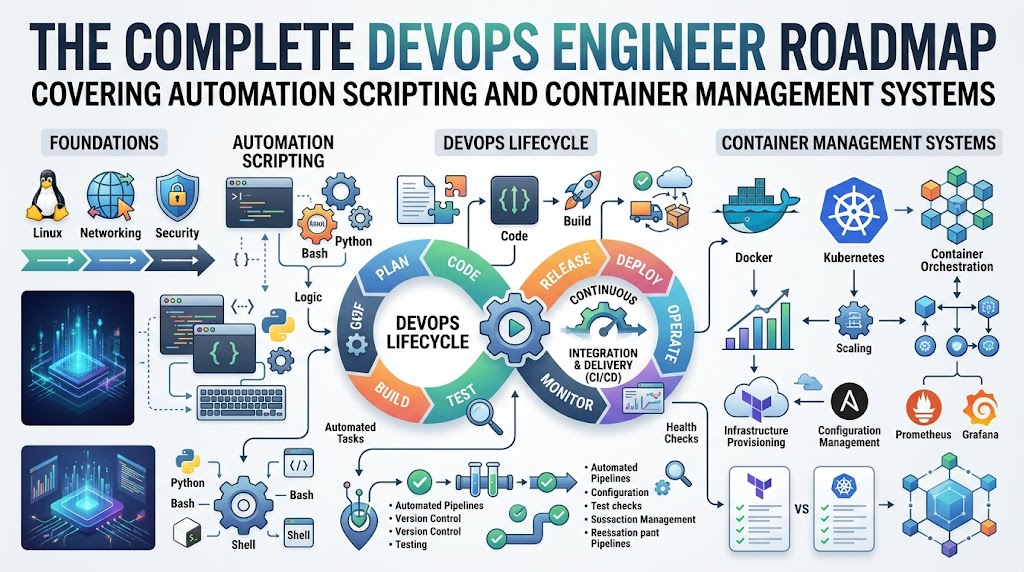
A DevOps roadmap is a simple step-by-step learning guide. Software teams build apps, and other teams run them. DevOps helps both teams work as one happy unit. Beginners often feel lost because tech has too many new words. You do not need to study everything on day one. A good guide shows you the right order to learn things. First, you build strong computer basics. Next, you learn how code moves to the web. Finally, you practice with real tools on small projects. This steady path keeps learning fun and stress-free.
What Is a DevOps Roadmap?
DevOps combines software creation with everyday computer operations. Think of a car factory. One group designs the car parts. Another group tests and drives the car on the road. DevOps builds the road and the safety belts. A DevOps roadmap is your clear map for this journey. It shows you the next skill to tackle. Many beginners make a big mistake here. They try to learn fifty different tools at once. Tools change every year, but basic skills stay useful forever. Therefore, you must focus on core skills first.
A Simple DevOps Learning Path
A clear DevOps learning path starts with the basics. First, you learn Linux to command computers with simple text. Next, you learn Git to save different versions of your code. Then, you learn basic networking to understand how websites talk online. After that, you explore cloud platforms to rent online servers. Next, you pack apps into neat boxes called containers with Docker. Then, you set up quick pipelines to test your code fast. Later, you run groups of containers with Kubernetes. You also write code to build servers automatically. Finally, you track errors with monitoring and keep systems safe with security tools.
| Learning Stage | Main Skills | Simple Goal |
| Stage 1: Basics | Linux, Git, Networking | Control computers and save your work safely. |
| Stage 2: Cloud and Boxes | Cloud, Docker Containers | Package apps and run them on rented servers. |
| Stage 3: Pipelines | CI/CD, Kubernetes | Test code fast and manage many apps together. |
| Stage 4: Automation | Code for Servers, Monitoring | Build setups automatically and fix errors quickly. |
DevOps Engineer Roadmap
A good DevOps engineer roadmap connects all these separate pieces together. First, you write small scripts with Python or Bash to do boring jobs. Next, you save that work inside Git repositories. Then, you build a container image for your application. After that, you build a pipeline to test every code change. The pipeline puts the fresh app inside a cloud server automatically. For example, imagine you build a small web store for toys. You store the code in Git. You set up a pipeline to check the code for mistakes. The pipeline puts the store inside a Docker container. Then, your script builds a cloud server. Finally, monitoring tools alert your phone if the toy store goes offline.
DevOps Tools You Should Understand
You do not need to memorize every brand name. It is better to learn DevOps tools by their job type. Source control tools like Git track every change in your files. Container tools like Docker wrap your app with its needed parts. CI/CD tools test and ship your code without human delay. Kubernetes groups these app boxes and keeps them running. Infrastructure as Code tools write down server setups as text files. Monitoring tools watch computer health like a smart hospital screen. Logging tools collect system diaries to show past events. Cloud platforms rent computer power across the world. Security tools lock the digital doors against bad hackers. GitOps uses Git as the single source to control your live systems.
| Tool Area | Purpose | Example Tools |
| Source Control | Save and track text changes | Git, GitHub |
| Containers | Pack apps into neat boxes | Docker, Podman |
| CI/CD Pipelines | Test and deliver software fast | Jenkins, GitHub Actions |
| Server Code | Build computer setups with text | Terraform, Ansible |
| System Health | Track live app health and alerts | Prometheus, Grafana |
DevOps Tools Comparison Made Simple
Doing a smart DevOps tools comparison helps teams pick the best software. First, look at the main purpose of the tool. Does it fix your exact problem today? Next, check the learning curve before you start. Some tools take months to master, but others take days. Also, compare the money costs and license rules carefully. Check security features to keep your data safe. Look for active community support and helpful guides online. You must also check if the tool fits your current systems. Think about your team skills before picking hard software. Finally, make sure the tool can grow as your website grows. The most famous tool is not always the best choice for you. Simple tools often work much better for small teams.
DevOps Certifications Roadmap
A DevOps certification roadmap can support your learning path. Certifications show that you studied hard and passed a formal test. But beginners should not rush to take exams right away. First, build hands-on skills through small home projects. Choose entry-level tests from major cloud providers to start. Check the exam rules, test costs, and expiration dates. Most certificates expire after two or three years. You will need to renew them over time. Practice tests help you prepare for the real questions. However, passing an exam will never guarantee a good job by itself. Real companies care most about practical skills. Certifications work best as proof of your effort. Use them to back up the real projects you build.
SRE Roadmap
An SRE roadmap guides you toward site reliability engineering. SRE experts keep big web apps running without crashes. First, you master Linux and computer networking rules. Next, you study how cloud systems talk to each other. You also build smart monitoring dashboards with alert sounds. When a website stops working, SREs find the cause quickly. This job is called incident response. You write code to fix the issue so it never happens again. SREs also set clear reliability goals for websites. They decide how much downtime is okay each month. Next, they plan capacity so servers handle holiday shopping traffic easily. Strong DevOps skills give you a great base to learn SRE.
Platform Engineering Roadmap
A Platform Engineering roadmap shows how to build tools for other coders. Big companies have hundreds of software developers. These developers want to ship code without managing complex servers. Platform engineers build an easy internal website for them. This internal platform acts like a custom store. A developer clicks one button to get a database and a pipeline. The platform engineer uses Linux, cloud tools, containers, and Kubernetes behind the scenes. They set up security rules and server code inside the platform. For example, think of a school library. The librarian organizes books so students find them fast. Platform engineers organize cloud tools so developers build apps without road blocks. This work makes everyone faster and happier.
Real-Life Scenarios and Learning Experiences
- A beginner tried to learn twelve tools at the same time and felt stuck. The learner stepped back and studied Linux commands for two weeks. Then, using simple terminal commands made cloud servers easy to understand.
- An online store crashed every Friday during new code updates. The team built an automated CI/CD pipeline to test code changes early. The new tests caught bugs early and stopped Friday crashes completely.
- A team built cloud servers by clicking buttons on a website. They made many small mistakes and forgot their old settings. They switched to code files for servers, which made every setup identical and safe.
- A junior engineer faced a broken database late at night. The engineer checked the system log files to spot the memory error. Reading simple log lines helped fix the database in five minutes.
Common Mistakes to Avoid When Choosing DevOps Paths
- Trying to study ten complex tools at once causes fast burnout. Pick one core tool and master it before moving on.
- Skipping Linux basics leaves you confused later on. Spend extra time learning common command line tools first.
- Watching video lessons without typing the commands teaches you very little. Type the code yourself and fix your own typos.
- Chasing hard certifications before building a basic project wastes your money. Build small working apps first to show real skills.
- Ignoring computer networking makes cloud setups very hard to debug. Learn how web addresses, ports, and routers work together.
- Forgetting about security creates dangerous leaks in your software. Always check for open ports and hidden passwords early.
- Relying on manual clicks to configure servers leads to costly human mistakes. Write small scripts to set up your servers automatically.
- Believing that one famous tool solves every problem hurts team success. Choose tools that match your exact project size and budget.
How DevOpsSchool.org Fits Into Your Learning Plan
DevOpsSchool.org offers open resources that support your engineering journey. The platform provides structured 90-day learning plans for many modern disciplines. You can find roadmaps for DevOps, SRE, and Platform Engineering. It also hosts a large technology directory to help you compare tools easily. Learners can explore certification resources and read helpful exam guides. The site also provides tutorials, hands-on lab ideas, and a helpful glossary. Beginners can use these free guides to build steady daily study habits. You can check the learning paths whenever you feel unsure about your next step. It serves as a helpful study guide beside your own hands-on practice.
DevOps Jobs and Career Growth
Many great career paths connect directly to DevOps skills. DevOps engineers build smooth pipelines and manage everyday releases. Site reliability engineers focus on app uptime and quick emergency fixes. Cloud engineers design safe networks and storage across cloud platforms. Platform engineers create clean internal tools that help developers work faster. DevSecOps engineers scan pipelines to catch security bugs early. You can prepare for these DevOps jobs by building public projects on GitHub. Show that you can solve real problems and troubleshoot errors. Practice explaining your project steps clearly for job interviews. Strong basics, personal curiosity, and regular practice will help you grow into these rewarding roles.
Frequently Asked Questions
1. What does a DevOps engineer do every day?
A DevOps engineer helps developers test and release code quickly. They write scripts to automate repetitive computer tasks. They also set up cloud servers and watch app health. When a deployment breaks, they help find the issue. Their main goal is to make software delivery fast, safe, and smooth.
2. Can I learn DevOps without knowing how to code?
Yes, you can start without deep software programming knowledge. However, you must learn basic scripting along your journey. Python and Bash help you automate boring daily jobs. You do not build big complex apps like developers do. You write simple code to connect tools and manage servers.
3. How much time does it take to learn DevOps basics?
Most beginners need about three to six months of regular study. Spending one or two hours every day brings the best results. You will spend the first month on Linux and Git. Then, you learn containers and cloud basics. Practicing real projects helps you learn much faster.
4. Which operating system should I learn first?
You should learn Linux before any other operating system. Most Internet servers and cloud platforms run on Linux today. Learning common terminal commands gives you direct control over machines. You can practice Linux commands for free inside small virtual machines on your home computer.
5. Do I need expensive computers to practice DevOps?
No, you do not need an expensive or powerful computer. A standard laptop with eight gigabytes of memory is plenty. Most tools run light containers that need very little power. Major cloud providers also give free trial tiers for new learners to practice online.
6. Are certifications necessary to land a job?
Certifications are helpful, but they are never strictly required. Practical projects and strong basics matter much more to hiring teams. An exam certificate shows that you study hard and understand the terms. However, showing a working project online proves you can actually do the job.
7. What is the difference between DevOps and SRE?
DevOps focuses on building pipelines and helping developers ship code quickly. Site reliability engineering focuses on system uptime, site speed, and crash prevention. DevOps builds the road for the software car. SRE makes sure the car runs safely without engine trouble. Both roles share many tools.
8. What is the best cloud platform for a beginner?
Amazon Web Services, Microsoft Azure, and Google Cloud are all great choices. You can pick whichever platform your local job market prefers. The core cloud ideas are identical across all three providers. Once you learn one provider, switching to another is very easy.
9. Why is Git so important for DevOps learners?
Git tracks every change made to your project text files. It lets you undo bad mistakes with a single command. DevOps teams store server configurations and pipeline setups inside Git. This lets teams share work safely and run automated tasks whenever someone saves new code.
10. How do I start building hands-on portfolio projects?
Start by creating a simple one-page website using HTML. Put that website file inside a Git repository. Next, package the website inside a Docker container. Then, write a script to launch the container on a free cloud server. Save all your project steps online for others to see.
11. What is the easiest way to compare different DevOps tools?
Always compare tools by looking at their core purpose first. Check how easy the tool is to learn and use. Read user guides and see if the tool has an active community. Also check the total cost and security features before choosing it for your team.
12. Where can I find structured guides for modern engineering skills?
You can explore structured learning paths on DevOpsSchool.org. The platform shares open 90-day roadmaps for DevOps, SRE, and cloud skills. It also offers tool directories, tutorials, and certification guides. These resources help beginners stay organized and study the right skills in the proper order.
Conclusion
Starting your software engineering journey is exciting when you follow a clear DevOps roadmap. Always begin with basic skills like Linux, Git, and networking before tackling advanced systems. Learn one skill at a time so you never feel overwhelmed. Practice your new knowledge by building small, practical projects on your home computer. Do not waste energy trying to chase every new tool on the market. Use certifications as simple supporting evidence for your hard work, not as magic tickets to a job. Later on, you can explore SRE or Platform Engineering roles. Keep solving small real-world problems step by step, and your technical skills will grow strong.